

Like
many
people,
I
find
the
standard
Joy-Cons
difficult
to
use
as
their
small
size
cramps
my
hands.
I’ve
tried
a
few
alternatives
but
most
of
them
always
came
with
major
downsides,
such
as
weak
rumble
or
no
gyro
controls,
and
eventually
settled
on
some
Skull
&
Co
grips
that
make
playing
in
handheld
far
better,
but
doesn’t
solve
the
issues
I
had
with
the
cramped
face
buttons
buttons.
That’s
where
Chinese
manufacturer
Mobapad
comes
into
the
picture.
You
might
recall
the
name
from
earlier
this
year
when
they
published
information
about
the
next
generation
Nintendo
console.
I
followed
up
with
them
at
the
time,
attempting
to
verify
their
claims
and
figure
out
how
they
had
come
by
the
information.
You
can
read
about
that
here.
After
the
article
went
live,
they
asked
if
I
wanted
to
check
out
one
of
their
products,
the
M6
HD,
a
set
of
replacement
Joy-Cons.
On
paper,
they
seem
offer
everything:
chunky
grips,
hall
effect
sticks,
mechanical
buttons,
rumble,
Amiibo
support,
gyro
controls
and
more.

It
almost
seems
too
good
to
be
true,
but
to
my
surprise,
the
M6
HD
delivers
on
nearly
every
front.
It
has
a
couple
of
issues
and
obviously
the
ergonomics
won’t
work
for
absolutely
everyone,
but
overall
these
are
among
the
very
best
Joy-Con
replacements
available.
Grabbing
both
controllers
from
the
box
reveals
two
things:
these
are
considerably
bigger
than
the
regular
Joy-Cons,
and
they
are
quite
a
bit
heavier,
too.
At
90g
they’d
be
fighting
in
a
different
weight
category,
for
sure.
It
doesn’t
make
Switch
heavy,
by
any
means,
but
it’s
still
a
substantial
increase
and
something
to
keep
in
mind
if
you
already
find
your
arms
tiring
from
holding
the
console
aloft.
The
extra
weight
combined
with
the
build
quality
help
to
make
the
M6
HDs
feel
like
a
quality
product.
There’s
zero
give
in
the
lightly
textured
plastic
shells
and
creaking
when
you
squeeze.
They
are
also
a
very
tight
fit
into
the
Switch’s
rails,
giving
them
a
great
sense
of
security.
Unlike
the
standard
Joy-Cons
which
creak
and
bend
a
little
when
slotted
in
place,
the
M6
HDs
are
solid.
I
feel
safe
holding
the
weight
of
the
Switch
in
just
one
M6
HD,
something
which
I
don’t
feel
safe
doing
when
using
the
regular
Joy-Cons
The
downside,
of
course,
is
that
the
M6
HDs
are
a
little
stiffer
to
slide
in
and
out
which
could
be
a
mild
headache
if
don’t
leave
them
in
permanently.
It
goes
without
saying
that
initial
impressions
cannot
replace
long-term
testing
to
determine
if
the
M6
HD
will
hold
up
to
everyday
usage.
A
quick
browse
of
Reddit
suggests
people
are
happy
with
the
Joy-Con’s
durability,
aside
from
a
slight
discolouring
of
the
sticks.
I’ll
update
this
review
if
I
encounter
any
issues
in
the
future
with
them.
In
terms
of
comfort,
the
difference
between
the
M6
HDs
and
the
regular
Joy-Cons
is
like
the
difference
between
a
cheap
cut
of
beef
and
a
really
nice
ribeye
steak
–
sure,
the
first
one
will
get
the
job
done,
but
ribeye
hits
different,
man.
Bigger
and
bulkier,
the
M6
HDs
make
the
Switch
feel
like
a
different
machine
in
handheld
mode
The
rear
has
nice
chunky
grips
that
sink
nicely
into
your
palms
and
all
the
buttons
have
room
to
breath
unlike
the
super-cramped
layout
of
the
Nintendo
Joy-Cons.
Even
the
triggers
feel
super-sized,
dwarfing
even
those
of
the
Xbox
Series
controllers.
Almost
every
button
on
the
M6
HDs
use
Omron
mechanical
micro-switches
giving
them
an
audible
clicking
sound
when
pressed
that
I
find
deeply
satisfying,
kind
of
like
how
I
found
the
clickety-clackety
of
a
mechanical
keyboard
sexy.
But
that’s
a
topic
for
a
different
time.
The
face
buttons
require
very
little
pressure
and
have
a
soft
feel,
almost
like
you
can’t
sense
them
moving
under
your
thumb
until
the
switch
activates.
There’s
isn’t
a
lot
of
travel
on
the
buttons,
either.
Despite
this
softness
and
short
travel,
they
never
feel
mushy.
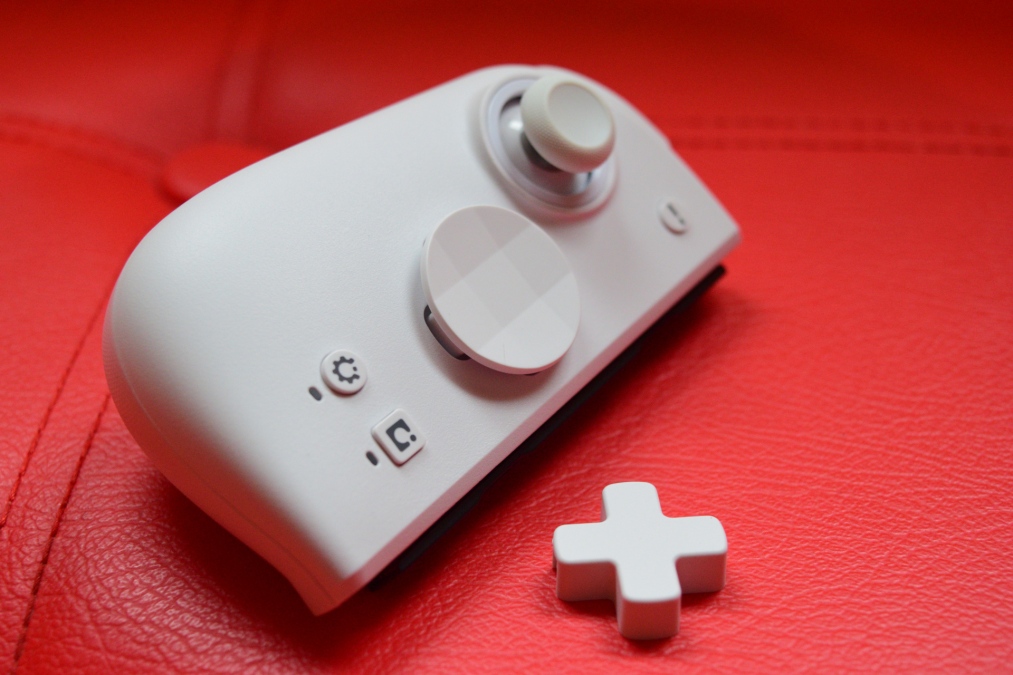
Swapping
to
the
D-Pad,
the
M6
HDs
actually
come
with
two
options
in
the
box:
a
traditional
D-pad,
or
a
circular
piece
that
resembles
the
one
found
on
the
Xbox
Series
controllers.
Again,
those
little
mechanical
switches
give
it
an
excellent
feel,
while
the
round
piece
is
great
for
games
that
require
a
lot
of
movement
on
the
D-pad,
although
it
isn’t
as
precise
as
the
regular
D-pad
option.
The
two
shoulder
buttons
are
the
weakest
of
the
bunch.
There’s
a
little
bit
of
wobble
on
them
and
more
pre-travel
before
the
switch
clicks.
They
don’t
feel
bad,
but
compared
to
the
crispness
of
the
other
buttons
they’re
letting
the
team
down
a
little.
The
triggers
don’t
have
that
slight
problem.
In
fact,
they
feel
excellent,
again
boasting
that
satisfying
clicky
sound.
They
need
just
enough
pressure
that
you
shouldn’t
accidentally
pull
them
without
meaning
too,
and
their
sizable
surface
area
and
slight
curve
feel
terrific.


On
the
rear
of
each
M6
lurks
an
extra
button
that
naturally
falls
right
under
your
middle
finger.
By
using
a
special
button
on
the
front
of
each
controller
you
can
remap
the
rear
buttons
so
that
they
mimic
the
function
of
any
other
button,
although
I
did
notice
that
it
only
seems
to
work
for
buttons
on
the
same
controller.
So,
for
example,
the
rear
right
button
can
be
remapped
to
mimic
A
or
B
or
the
right
trigger,
but
cannot
be
copy
the
left
shoulder
button
or
D-pad.
This
limitation
can
be
worked
around
by
remapping
controls
using
the
Switch
itself,
or
by
downloading
the
official
Mobapad
app.
That
brings
us
to
a
fairly
large
issue:
the
Mobapad
app
is
on
the
Apple
store
and
can
be
downloaded
for
PC,
but
Android
users
like
myself
can’t
get
it
via
the
Play
store.
The
only
option
is
to
sideload
it
onto
your
phone
or
tablet,
and
for
a
lot
of
people
that
won’t
be
an
option
worth
entertaining
due
to
the
potential
security
concerns.
Pushing
that
issue
aside
though,
being
able
to
shift
a
command
to
the
rear
opens
up
a
lot
of
benefits.
Playing
any
shooter
provides
a
good
example
because
you
can
transfer
reloading
onto
the
rear
button,
meaning
you
don’t
have
to
take
your
thumb
off
of
the
right
stick.
That
can
be
a
big
advantage,
especially
in
multiplayer.
Even
in
singleplayer
games,
remapping
can
be
a
huge
help
too,
like
popping
the
stick
presses
to
onto
the
rear
buttons.
I
played
Mario
Odyssey
like
that,
with
jump
mapped
to
the
backside
of
the
Joy-Cons
so
I
didn’t
have
to
take
my
thumb
off
the
stick.

The
functionality
of
the
rear
buttons
doesn’t
end
there,
either.
You
can
also
record
macros
for
reach
of
them,
queuing
up
multiple
commands
and
pauses
which
will
play
out
in
sequence.
You
could
program
it
to
jump,
pause
for
a
few
seconds,
jump
again,
attack
then
duck,
and
once
that’s
done
a
single
press
of
the
rear
button
will
initiate
the
recorded
commands.
You
can
even
set
it
to
loop
the
sequence
indefinitely,
if
you’d
like.
Want
even
more
functionality?
How
about
a
turbo
mode?
Yes,
you
can
have
that,
too.
Joystick
drift
has
been
an
issue
with
the
Joy-Cons
since
day
1,
even
resulting
in
a
couple
of
attempted
lawsuits.
The
M6
HDs
solve
this
issue
by
utilising
hall
effect
tech,
meaning
that
magnets
are
used
to
track
what
the
stick
is
doing
rather
than
a
potentiometer.
Without
any
physical
wear
and
tear
occurring,
it
means
that
tracking
can
never
degrade
like
it
traditional
sticks
and
thus
drift
shouldn’t
be
an
issue.

The
sticks
themselves
feel
great
to
use
thanks
to
the
nicely
judged
tension.
Both
sticks
are
nicely
sized
and
feature
an
excellent
rubber
grip.
They
are
also
perfectly
positioned
in
terms
of
height,
letting
me
get
the
tips
of
my
thumbs
on
both
of
them
without
it
feeling
uncomfortable
or
strained.
On
other
controllers,
the
sticks
can
be
quite
high,
leading
to
a
smidgen
of
thumb
strain.
I
also
really
appreciate
the
super-smooth
gates
on
the
circumference
of
the
sticks,
giving
them
a
fantastic
gliding
sensation.
On
the
right
side,
the
stick
is
quite
close
to
the
face
buttons.
That
might
cause
you
to
catch
the
stick
with
your
thumb
if
you
tend
to
press
the
face
buttons
with
the
pad
of
your
thumber
rather
than
the
tip.
Since
I
tend
to
use
the
very
tip
of
my
thumb
this
was
never
a
problem,
but
in
the
interest
of
trying
to
provide
a
detailed
review
I
swapped
over
to
using
the
pad
of
my
thumb
and
found
myself
knocking
into
the
stick
a
little
bit.
Never
enough
to
move
the
stick
or
cause
an
issue,
but
worth
mentioning.
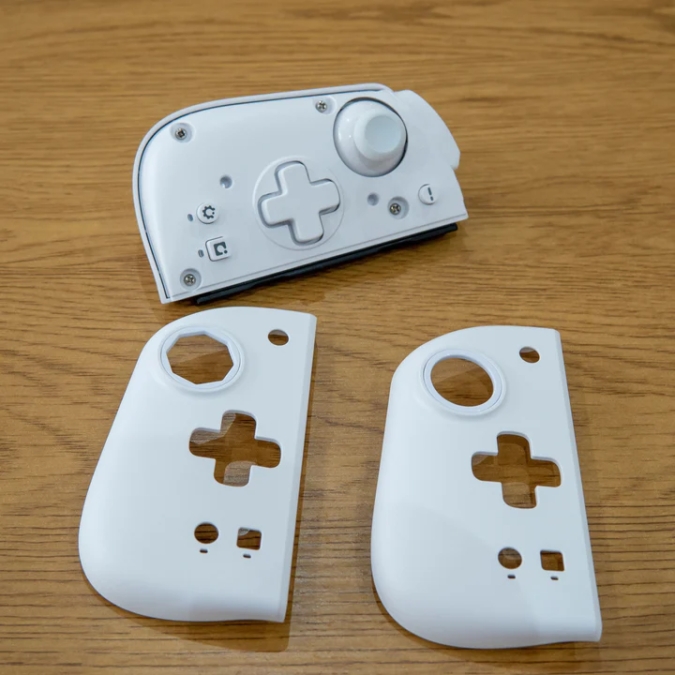
The
faceplates
can
be
removed
and
replaced
with
different
coloured
ones.
Currently
pink,
purple
and
blue
are
offered,
but
they
aren’t
cheap,
coming
in
at
$32.
You
can
also
swap
out
the
right
faceplate
for
one
which
has
an
octagonal
gate.
I
never
needed
to
do
that,
but
it’s
a
nice
extra
to
have.
credit:
Mobapad
Most
3rd
party
alternatives
on
the
market
either
skip
the
rumble
feature
entirely
to
save
money
or
offer
a
very
cheap
version.
Some
are
better
than
others,
of
course,
like
the
Binbok
controller
I
reviewed
a
little
while
ago.
The
M6s
are
uncommon
in
that
they
not
only
have
rumble
but
actually
do
it
quite
well.
As
well
as
the
official
Joy-Cons?
Nah.
They
lack
a
little
of
the
nuance
that
the
proper
Joy-Cons
have,
but
to
be
honest
it
didn’t
bother
me
in
the
slightest
and
was
only
really
noticeable
on
the
first-party
Nintendo
games.
For
everything
else,
the
rumble
did
its
job
just
fine
and
is
very
close
to
what
the
official
Joy-Cons
can
do.
Other
features
of
the
M6
HDs
include
full
Amiibo
support
which
is
very
rare
indeed.
These
days
it’s
probably
a
niche
feature,
but
for
those
of
you
have
want
to
scan
Amiibo’s
its
there.
And
there’s
proper
gyro
support
as
well.
One
disappointment
is
that
there’s
no
centre
piece
included
to
turn
the
M6
HDs
into
a
regular
controller
for
docked
mode
play
sessions.
Mobapad
doesn’t
sell
one
and
the
standard
centre
piece
included
with
the
Switch
isn’t
compatible.
The
good
news
is
that
plenty
of
3rd
party
options
from
Amazon
will
work
just
fine,
such
as
this
£10
one.
Finally,
the
battery
life.
Mobapad
claims
around
15
hours
of
playtime,
and
that
seems
pretty
accurate
based
on
my
testing.
Depending
on
the
games
I
was
played
and
the
intensity
of
vibration,
I’d
get
anywhere
from
12-16
hours.
Of
course,
only
time
will
tell
how
quickly
the
batteries
will
deteriorate.

Let’s
talk
pricing
and
variations.
At
an
RRP
of
$96,
the
M6
HDs
are
not
a
the
cheapest
choice
on
the
market,
and
are
quite
expensive
even
compared
to
something
like
the
Hori
Split
Pad.
However,
you
do
get
a
lot
of
tech
packed
into
these
bad
boys.
There
is
a
cheaper
version
of
the
M6
available
called
the
M6S
which
cost
a
much
more
budget
friendly
$60.
Ergonomically,
they
are
identical
to
the
M6
but
under
the
hood
they
have
a
generic
microswitch
instead
of
the
fancier
Omron
switches,
and
the
Alps
HD
rumble
is
replaced
with
a
lesser
system.
The
battery
life
is
also
rated
at
a
few
hours
less.
I
don’t
have
the
M6S
in
my
hands
so
I
cannot
comment
on
how
much
these
changes
effect
the
overall
feel
and
performance.
Generally
speaking
though,
the
cheaper
switches
should
still
feel
good,
and
for
most
people
I
can’t
imagine
the
lesser
rumble
would
be
a
big
deal.
Availability
is
a
little
tricky.
Mobapad
does
have
a
US
specific
store
where
its
products
seem
to
be
in
a
constant
state
of
being
discounted.
They
ship
to
various
other
places
including
the
UK,
but
there
doesn’t
seem
to
be
anywhere
selling
them
natively
in
lovely
old
blighty.
That
leaves
the
official
Mobapad
site,
or
questionable
sources
such
as
Temu.
CONCLUSION
The
Mobapad
M6
HD
offer
pretty
much
everything
you
could
want
in
a
third-party
Joy-Con,
including
features
that
are
often
missing
from
3rd
party
alternatives.
They
offer
vastly
superior
comfort
compared
to
the
cramped
official
Joy-Con,
making
the
handheld
experience
so
much
better.
The
buttons
are
excellent,
the
build
quality
is
great
and
the
extra
features
are
very
handy.
Downsides
are
limited:
the
rumble
isn’t
quite
as
good,
the
limited
colour
selection
is
a
bummer
and,
if
I’m
honest,
customer
support
can
be
very
hit
and
miss
when
dealing
with
Chinese
companies.
Although,
that
can
be
said
of
just
about
every
company
across
the
globe.
Of
all
the
Joy-Cons
I’ve
tried,
the
M6
HD
is
easily
the
best
of
the
bunch
and
has
made
playing
the
Switch
a
joy
rather
than
a
hand-cramping
con.